Radio Panel

Radio Panel

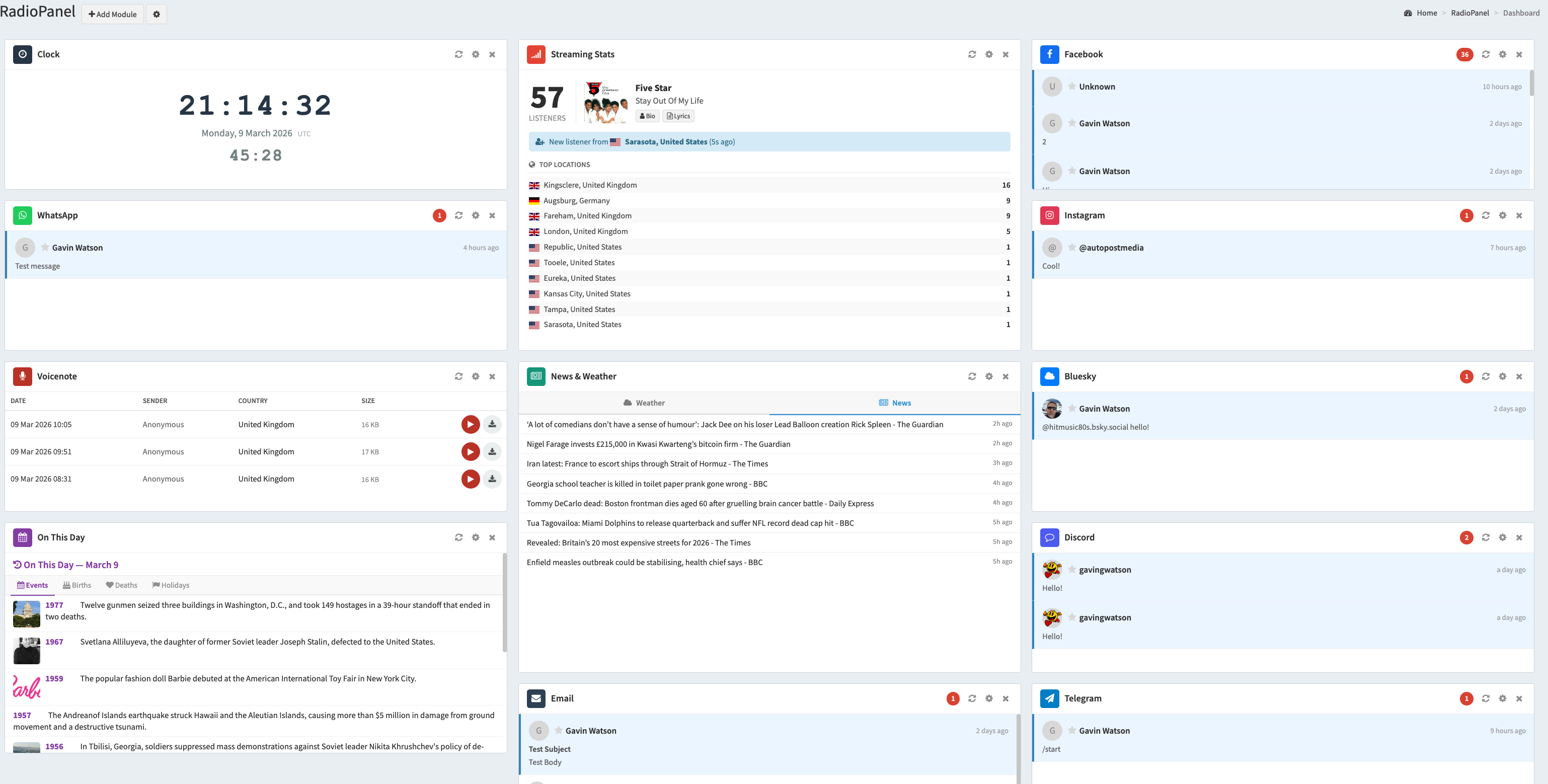
Radio Panel is the all-in-one social media inbox and broadcasting dashboard built for radio stations. It brings together every channel your listeners use — Facebook, Instagram, X (Twitter), Bluesky, Discord, Telegram, WhatsApp, Email, SMS, Voicenotes, and Chat Widget — into one customisable screen that presenters and DJs can access from any browser.

No more switching between tabs or apps. See every message, comment, and mention across all your platforms in real-time. Reply to listeners directly from the dashboard without ever leaving the page. Compose and publish social media posts to six platforms at once — immediately, on a schedule, or as recurring posts.

Beyond social media, Radio Panel integrates your streaming server stats, local news and weather, historical "On This Day" content for on-air discussion, a studio clock with countdown to the top of the hour, and much more.


 Unified Social Media Inbox

All your messages, comments, and mentions from every platform — displayed on a single dashboard. Each platform lives in its own draggable, resizable module so you can arrange the layout that works best for your workflow.

RadioPanel social media dashboard for DJs and presenters

Supported Platforms

  • Facebook Page — comments, Messenger conversations, visitor posts
  • Instagram — post comments, mentions, and tags
  • Bluesky — mentions and replies
  • X (Twitter) — mentions of your account
  • Discord — messages from your server channels
  • Telegram — real-time messages via bot webhook
  • WhatsApp — real-time messages (text, images, voice, video, documents)
  • Email — POP3 inbox with SMTP reply support
  • SMS MessageBoard — listener text messages via shared phone numbers
  • Voicenote — listener voice recordings, playable in-browser
  • Chat Widget — live chat panel powered by the autopo.st Chat Widget

 Reply Directly From the Dashboard

Don't just read your messages — respond to them. Click the reply button on any message and type your response without leaving the dashboard. Replies are sent natively through each platform's API, so your listeners see them exactly as if you replied from the official app. Supported on Facebook (comments and Messenger), Instagram (comments), Bluesky, X (Twitter), Discord, Telegram, WhatsApp, and Email.


 Multi-Platform Social Publishing

Compose a post once and publish it to six platforms simultaneously — Facebook, Instagram, Bluesky, X (Twitter), Discord, and Telegram. Attach images from your Media Library or upload new ones. Preview how your post will appear on each platform before publishing.

  • Post Now — publish immediately to selected platforms
  • Scheduled Posts — set a specific date and time for a one-time post, up to 90 days in advance. Cron-powered delivery ensures posts go out on time, even if you're not online.
  • Recurring Posts — set posts to repeat on selected days of the week at a specific time. Choose your timezone and the system handles the rest. Perfect for "Good Morning" posts, show promotions, or weekly segments.
  • Media Library — upload and store images with companion text for easy reuse. Select from your library when composing any post.
  • Activity Log — view the full history of every scheduled and recurring post: which platforms succeeded, which failed, and why. Helpful for troubleshooting delivery issues.

 Streaming Server Integration

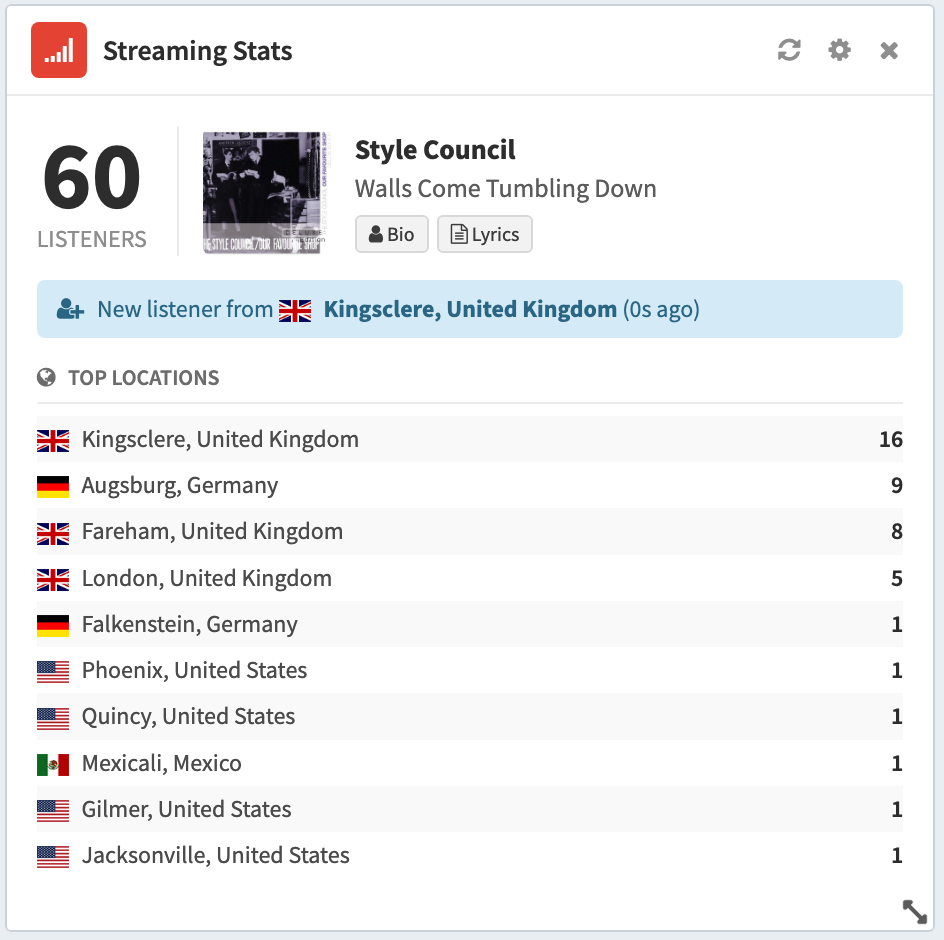
Connect your Icecast or Shoutcast streaming server (v1 and v2 supported) and see live stats right on your dashboard:

  • Current and peak listener count
  • Now playing track with album cover art (fetched automatically)
  • Artist biography — click to read about the currently playing artist
  • Song lyrics — lyrics for the current track, displayed automatically
  • Listener geolocation — see which countries your listeners are tuning in from, with flag icons (requires admin password)
  • Newest listener — see where your latest listener connected from

 On This Day In History

Give your presenters instant on-air content. The On This Day module shows historical events, famous births, notable deaths, and public holidays for today's date. Plus, browse the Number 1 single for every year on today's date — choose between the UK Singles Chart and US Billboard Hot 100 — with cover art and playback links.


 Local News & Weather

Stay on top of what's happening locally. Configure your country and city and the module delivers the latest news headlines and current weather conditions (temperature, wind, humidity, and weather icon) — all updated automatically on the dashboard.


 Studio Clock & Countdown

A clean digital clock with your configured timezone, the current date, and a countdown to the top of the hour — turning red when under 60 seconds. Exactly what presenters need to hit their cues.


 Desktop & Audio Notifications

Never miss a message. Radio Panel uses browser desktop notifications to alert you when new messages arrive in any module. Enable audio alerts with a single click for an audible chime — perfect for presenters who have the dashboard on a secondary screen.


 Fully Customisable Grid Layout

Every module can be dragged, resized, added, and removed. Arrange your dashboard exactly how you want it — your layout is saved automatically and loads instantly on your next visit. Each user gets their own layout.


How Does It Work?

Sign up, connect your social media accounts through our guided setup wizard, and start using the dashboard immediately. Each module has a step-by-step setup page — just authorise the platform and you're done. The dashboard auto-refreshes every 30 seconds, so new messages appear automatically while you're on air.


Simply visit our pricing page, select the Radio Panel service, create an account and you're ready to go.

You can publish posts simultaneously to Facebook, Instagram, Bluesky, X (Twitter), Discord, and Telegram. Text and images are supported on all platforms. Instagram requires an image with every post.

Connect your social media accounts through the guided setup pages, then add modules to your dashboard. Each module displays messages from one platform. The dashboard auto-refreshes every 30 seconds so new messages appear automatically. You can drag, resize, add, and remove modules to create your perfect layout.

Radio Panel supports Icecast and Shoutcast (both v1 and v2). It displays listener count, now playing track with cover art, artist bio, song lyrics, and listener geolocation data. For geolocation features, your streaming server admin password is required.

Yes! You can schedule one-time posts up to 90 days in advance, or set up recurring posts that repeat on selected days of the week at a specific time. Both support all six publishing platforms and images from your Media Library. Posts are delivered by a server-side cron system, so they go out on time even if you're not logged in.