Cloud DAB & DAB+ Encoder

  • Home
  • Cloud DAB & DAB+ Encoder

Professional DAB & DAB+ Encoding in the Cloud

Our Cloud DAB & DAB+ Encoder gives radio stations a complete managed route from studio audio to the digital radio multiplex, without the need to install and maintain dedicated encoding hardware at your premises.

Choose DAB+ with AAC-based encoding or classic DAB with MPEG Layer II, while using the same managed source control, programme processing, metadata, monitoring, alerting and EDI delivery platform.

The service is designed for broadcasters who need more than a basic cloud encoder. Automatic failover and failback, multiple backup sources, emergency audio, broadcast processing, dynamic metadata, DLS, DL+, slideshow, live analysis, detailed monitoring, alerting, operational logs, service reports and multiple multiplex destinations are all managed from one control panel.

More than an encoder: manage the programme path from studio source to multiplex delivery.
No dedicated encoder appliance to buy, no local encoder operating system to maintain and no separate collection of monitoring tools. Your service runs in our managed broadcast infrastructure and can be securely controlled from anywhere.

Features

  • 100% cloud managed DAB and DAB+ encoding
  • Classic DAB MPEG Layer II and DAB+ AAC encoding
  • Existing stream URL or direct studio ingest
  • Automatic source failover and failback
  • Silence-triggered source failover
  • Multiple backup programme sources
  • Emergency audio fallback
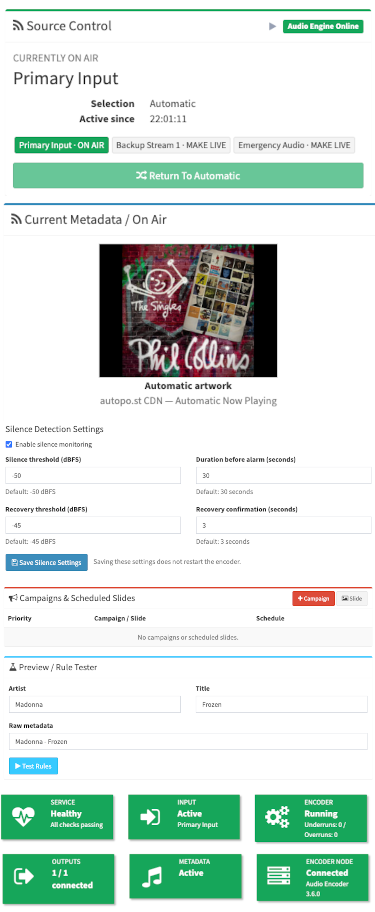
  • Manual MAKE LIVE / return-to-automatic source control
  • Integrated programme audio processing
  • Dynamic metadata, DLS, DL+ and SLS slideshow
  • Artwork automation, rules, overrides and scheduling
  • Multiple TCP and UDP EDI multiplex destinations
  • Live VU meters, silence monitoring and audio analyser
  • Input, processing, encoder, PAD and output monitoring
  • Email, SMS, voice and webhook alerting
  • Slack, Teams and PagerDuty integrations
  • Structured operational and audit logs
  • Scheduled availability and service reports
  • Receiver-style DAB display preview

How does it work?

There is no specialist encoder hardware for you to install. Your station sends programme audio to autopo.st either by providing an existing live stream URL or by connecting a standard Icecast-compatible source encoder directly to the platform.

Your Studio
Existing stream or direct source connection
Source Management
Failover, backups, emergency audio and manual control
Process & Encode
Audio processing, DAB/DAB+ encoding and PAD
Your Multiplex
EDI delivery to one or more mux destinations

Use your existing stream or encode directly to us

If you already operate an internet radio stream, we can use it as your programme source. The platform verifies the stream, detects its audio format and continuously monitors its health.

Alternatively, connect your studio automation or source encoder directly to our platform using standard Icecast-compatible source streaming. This provides a dedicated contribution path without requiring a public listening stream.

Automatic failover that keeps your programme on air

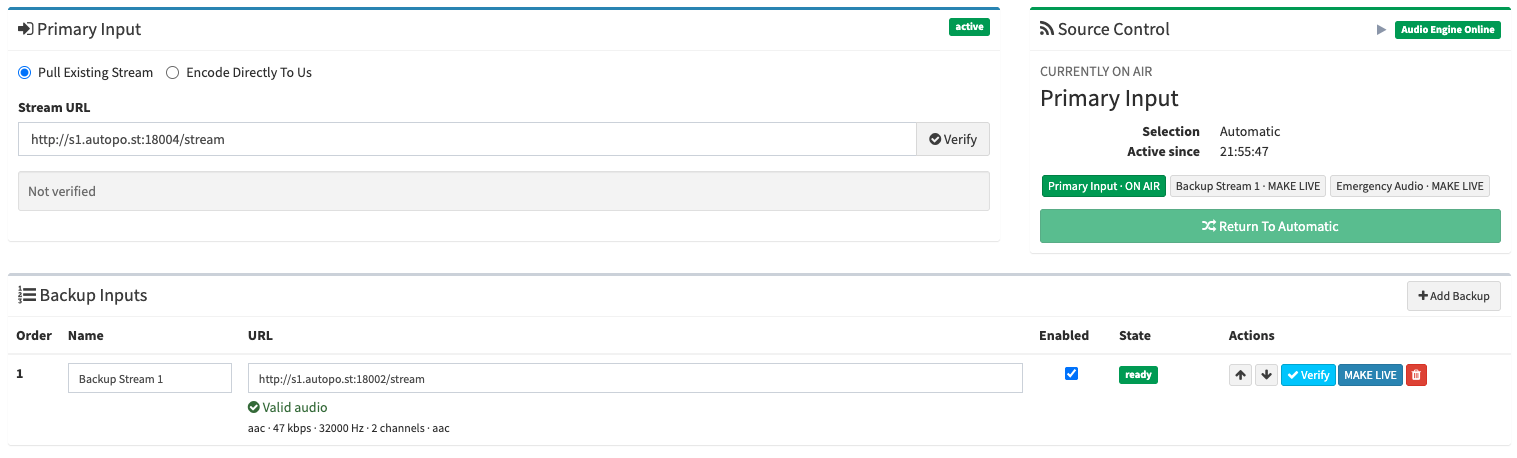
Add multiple backup sources in priority order. If the primary source disconnects, stalls or meets your configured silence conditions, the platform can automatically switch to the next healthy source. When the primary returns and remains stable, it can be returned to service according to your failback policy.

You can also upload emergency audio as the final programme fallback. Authorised users can make another healthy source live from the control panel and later return the service to automatic source selection.

Broadcast audio processing

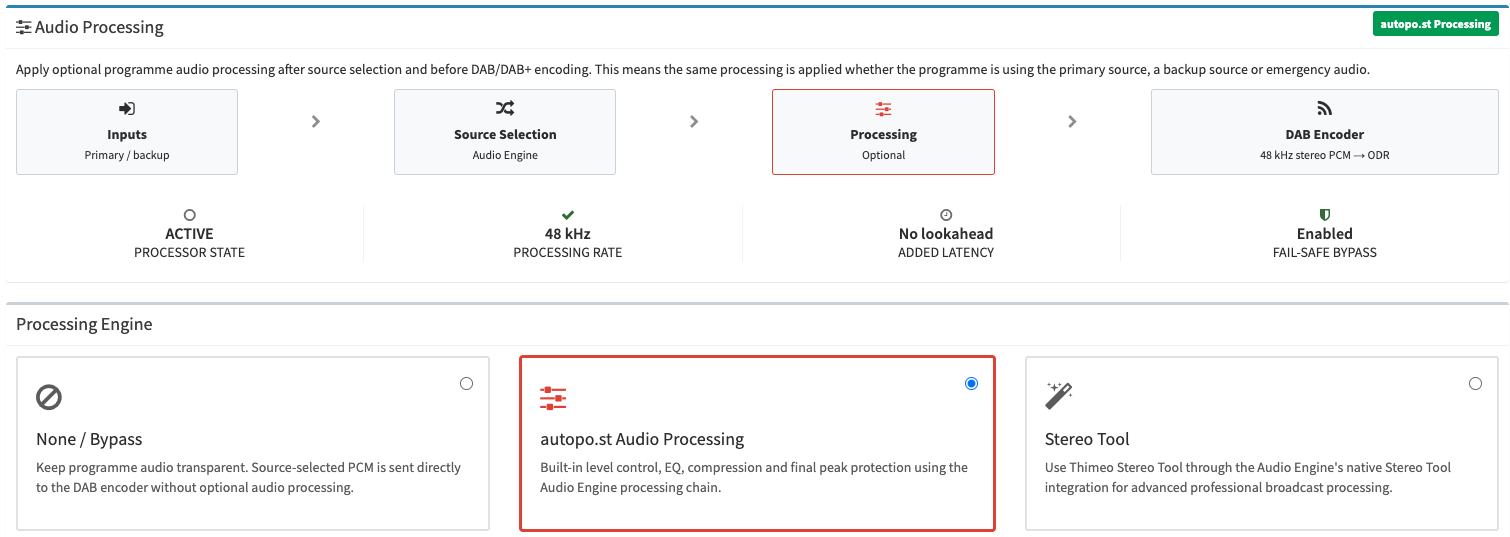
Programme processing is applied after source selection and before DAB/DAB+ encoding, so the same station sound follows whichever primary, backup or emergency source is currently on air.

Built-in processing can manage programme level, AGC, equalisation, compression, limiting, stereo width and output gain. Processing changes are validated before they are applied, with safe bypass and rollback behaviour designed to protect the programme path if a configuration cannot be activated successfully.

  • Consistent processing across primary, backup and emergency sources
  • Built-in AGC, EQ, compression and limiting controls
  • Stereo width and output level management
  • Safe bypass and configuration rollback
  • Optional Stereo Tool integration where configured

DAB and DAB+ from the same platform

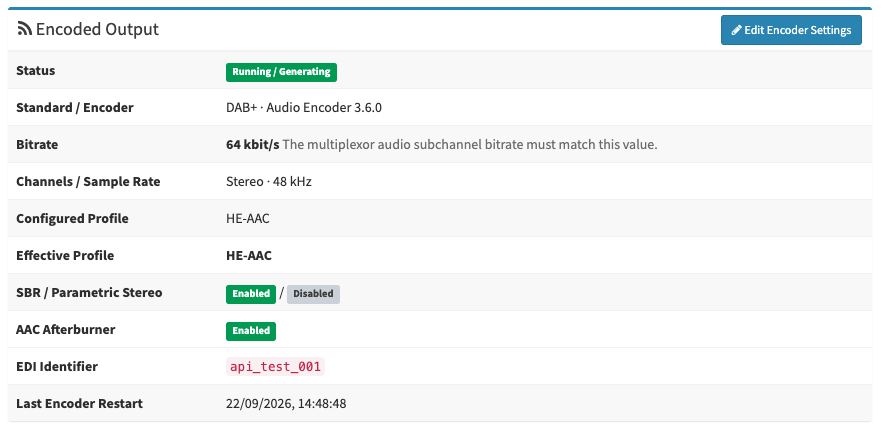
Select the broadcast standard required by your multiplex operator. DAB+ services use AAC-based encoding, while classic DAB services use MPEG Layer II. The platform shows only the settings that are relevant to the selected technology and validates the encoder configuration before applying changes.

DAB+

AAC-based digital radio encoding with configurable bitrate and codec profile.

  • AAC-LC, HE-AAC and HE-AAC v2 profile handling
  • Mono and stereo service support
  • Technology-specific configuration validation

Classic DAB

MPEG Layer II encoding for multiplexes and markets that continue to use classic DAB services.

  • MPEG-1 Layer II audio encoding
  • Mono and stereo configuration
  • DAB-specific bitrate and channel-mode validation

Professional EDI delivery to your multiplex

EDI can be delivered to multiple multiplex destinations, allowing primary and secondary mux paths to be configured independently. TCP destination health is monitored in real time, while UDP delivery is clearly identified as unacknowledged rather than being incorrectly shown as connected.

  • Multiple TCP and UDP EDI destinations
  • Destination connection testing and runtime status
  • Safe encoder configuration apply and rollback
  • Optional EDI timestamping and FEC where configured and supported
  • Clear multiplex requirements for the selected DAB/DAB+ configuration

Dynamic metadata, DLS, DL+ and slideshow

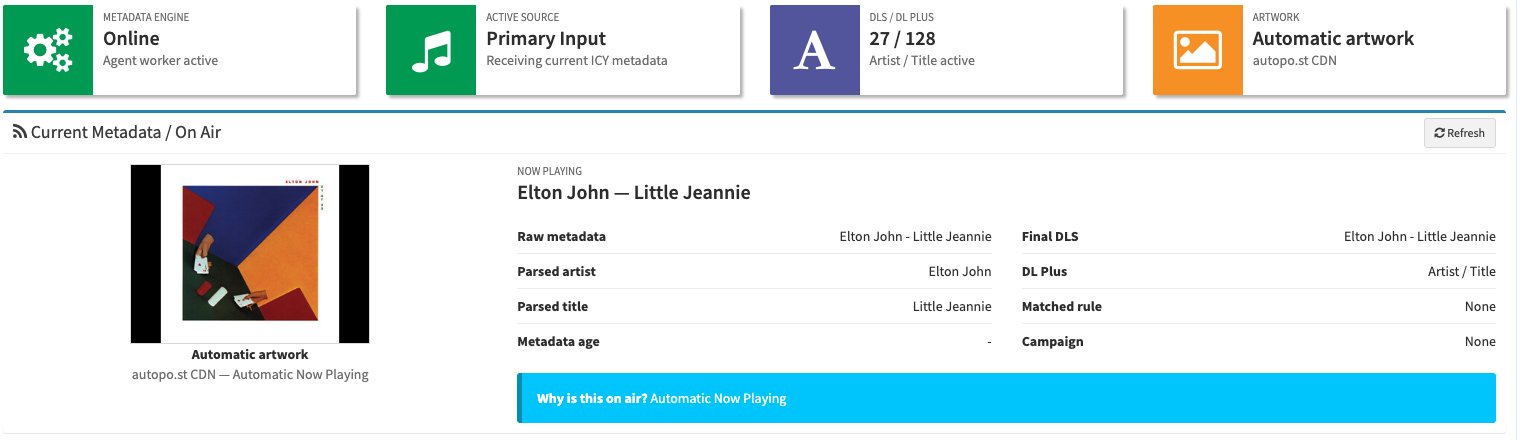
Deliver more than just audio. Metadata follows the source that is actually on air, including automatic failover, manual source changes and emergency operation, helping prevent stale programme information being left on the receiver after a source switch.

Artist and title information can be parsed, normalised, transformed and filtered before delivery. DLS and DL+ can be generated from the effective metadata state, while Slideshow (SLS) can display station graphics, programme images and now-playing artwork on compatible receivers.

Artwork can be supplied by the station, mapped to specific content or automatically sourced where configured. Scheduling, programme information, presenter details, promotional messages, manual overrides and artwork rotations can all be managed as part of the metadata workflow.

  • Active-source-aware now-playing metadata
  • DLS and DL+ generation
  • SLS / MOT slideshow artwork
  • Customer artwork library and track mappings
  • Automatic artwork lookup where configured
  • Rules, templates, scheduling, rotations and manual overrides

Live monitoring from input to multiplex

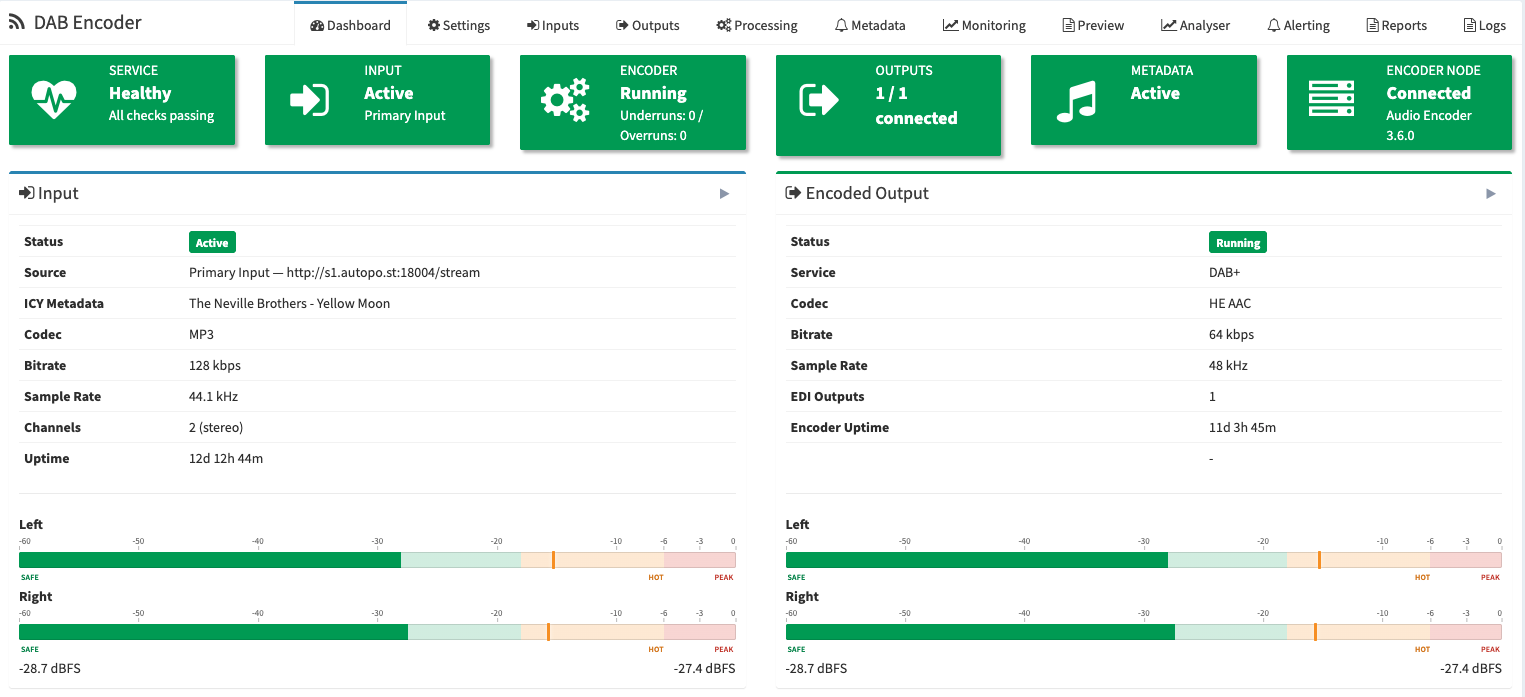
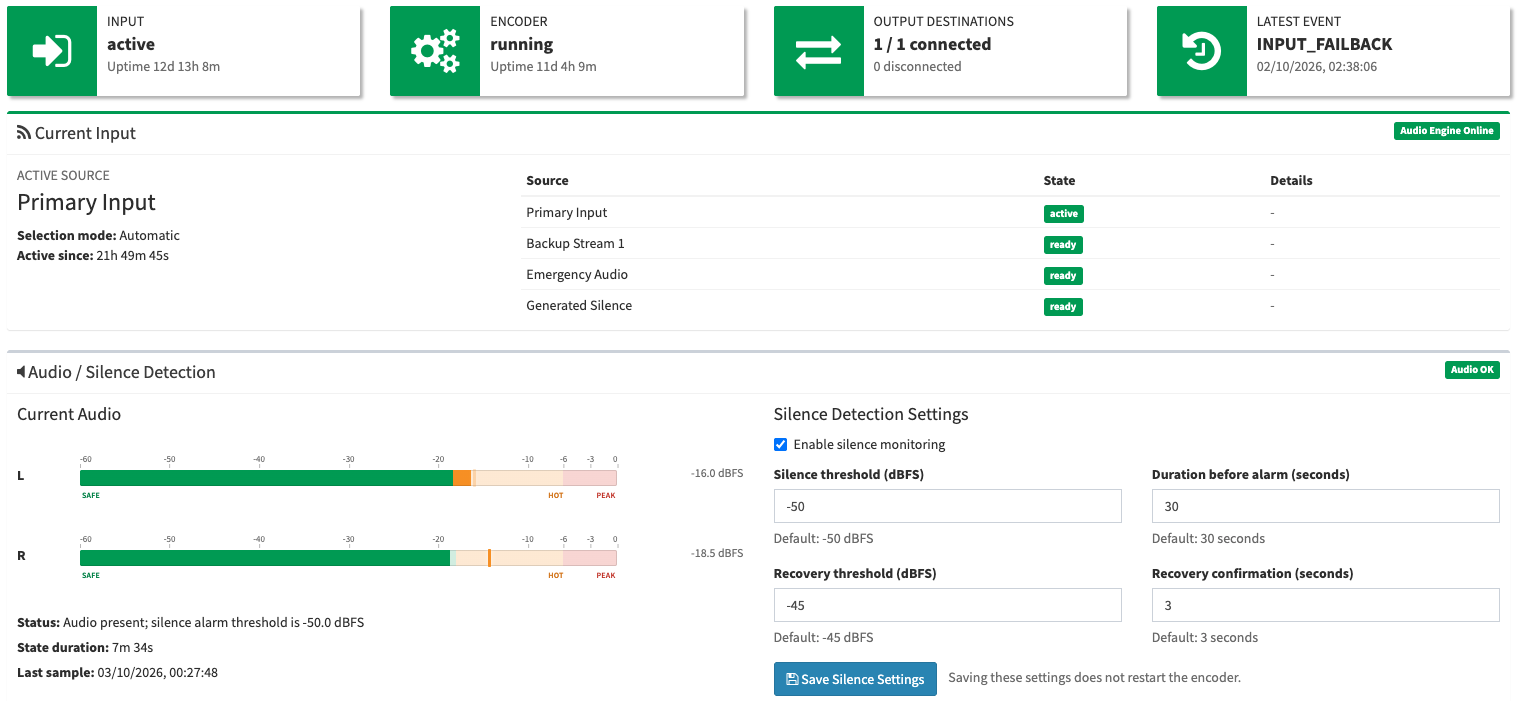
See the health of the complete contribution chain from one dashboard. Monitor the active input source, source-management engine, programme processing, DAB/DAB+ encoder, PAD service, telemetry and every configured EDI output.

Live stereo VU meters show current programme levels, while configurable silence monitoring can raise incidents or trigger input failover according to the policy you choose.

Monitor

  • Primary and backup source health
  • Current on-air source and active duration
  • Source-management engine health
  • Processing status
  • DAB / DAB+ encoder status
  • PAD / metadata status
  • EDI TCP destination connectivity
  • Telemetry freshness

Detect

  • Input disconnection or invalid source
  • Silence conditions
  • Processing fault / bypass state
  • Encoder process failure
  • PAD failure
  • Output connection loss
  • Automatic failover/failback
  • Emergency source activation

Live broadcast audio analyser

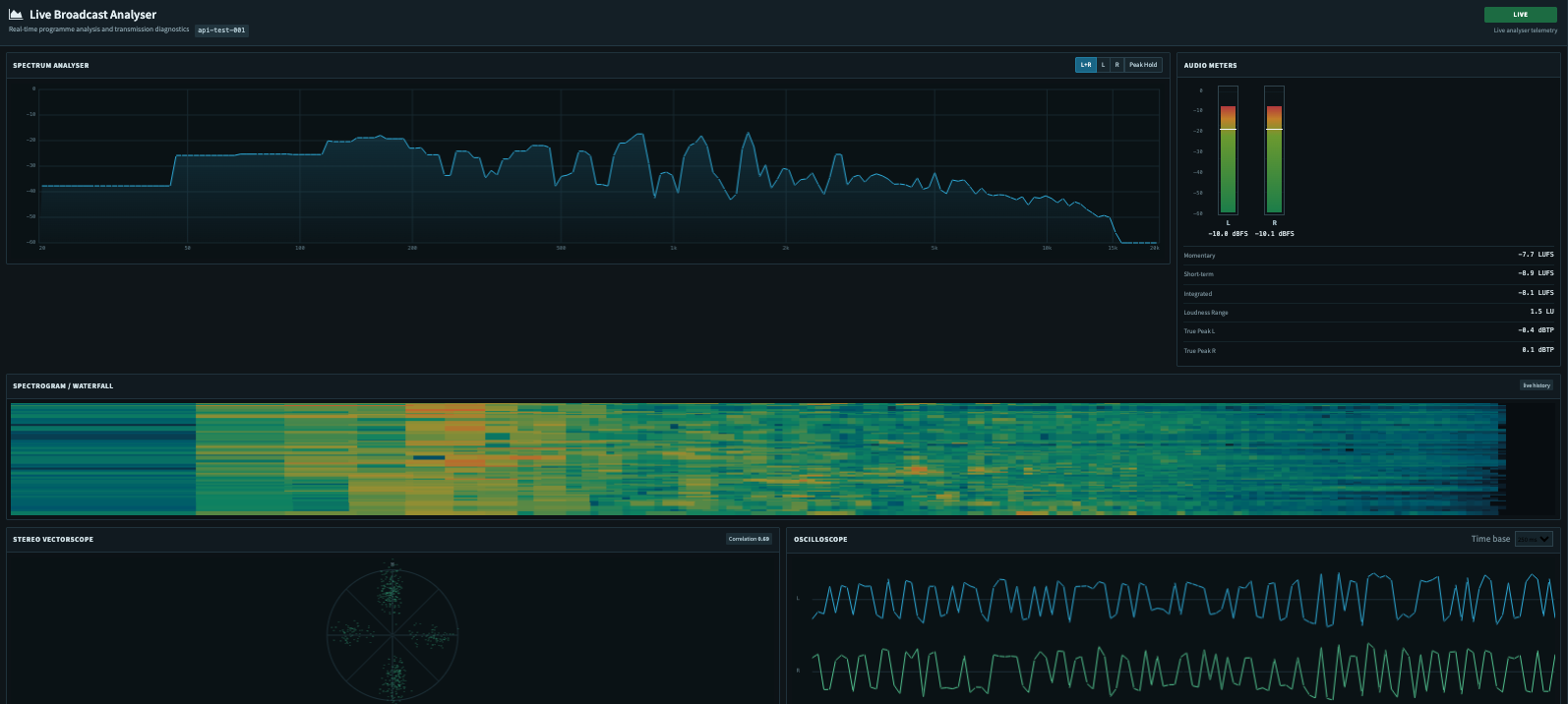
Go beyond simple VU meters with a dedicated analyser view for the programme signal being supplied to the encoder. Detailed visual telemetry helps engineers identify level, loudness, stereo and spectral issues without placing another reader in the critical encoder audio path.

  • Detailed left/right programme levels
  • Loudness and peak analysis
  • Spectrum and waveform views
  • Stereo correlation / phase visibility
  • Encoder, PAD and EDI technical status alongside audio analysis

See what your listeners see

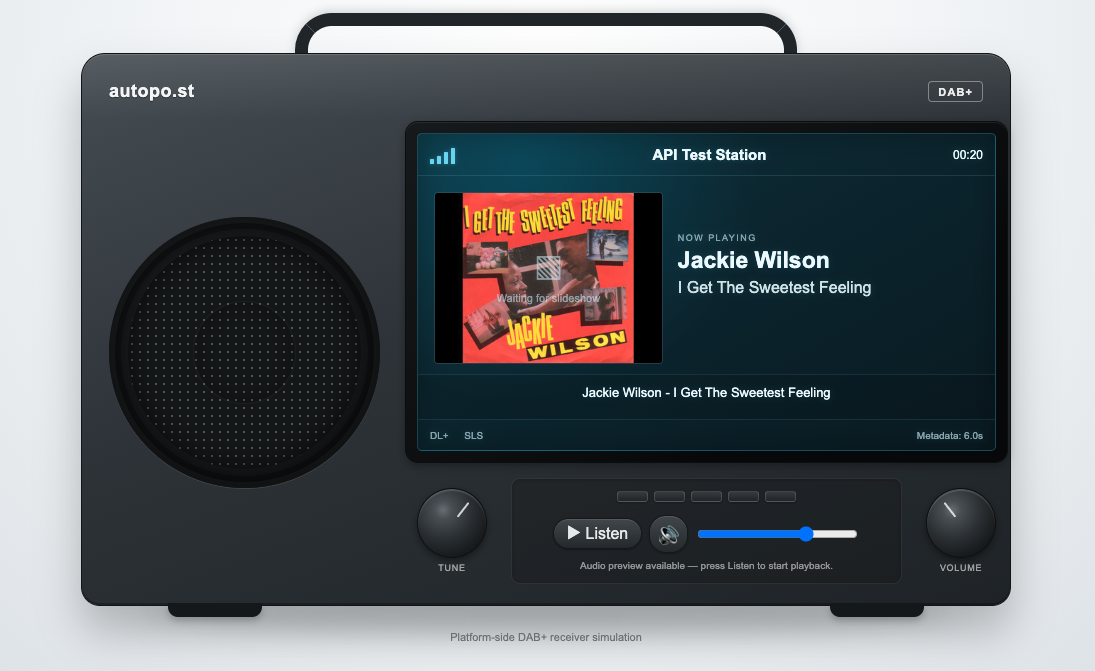
Receiver Preview presents the current service through a simulated colour-screen DAB receiver using the effective service, metadata and slideshow state generated by the platform.

View the service name, DLS, DL+, programme information and current SLS artwork together in a receiver-style display, making it easier to check the customer-facing presentation without moving between separate technical status panels.

Receiver Preview is a platform-side visualisation of the current generated service state; independent off-air receiver verification remains a separate engineering test.

Alerts that reach the right people

Create contacts and contact groups, then decide exactly which conditions should reach which people. Alerts can be routed by email, SMS, automated voice call, generic webhook, Slack, Microsoft Teams or PagerDuty.

Escalation rules, trigger delays, recovery notifications, maintenance windows, acknowledgement and incident deduplication help avoid alert storms while still making sure genuine problems reach the right person.

  • Multiple email, SMS and voice contacts
  • Reusable contact groups
  • Per-condition notification routing
  • Email, SMS and automated voice-call notifications
  • Slack, Teams, PagerDuty and generic webhooks
  • Escalation, acknowledgement and recovery workflow
  • Maintenance windows and delivery history

Detailed logs and scheduled reports

Search structured operational and audit logs by time, component, category and severity, or follow events as they happen. Important configuration changes and manual actions are recorded alongside technical incidents so you can see exactly what happened and when.

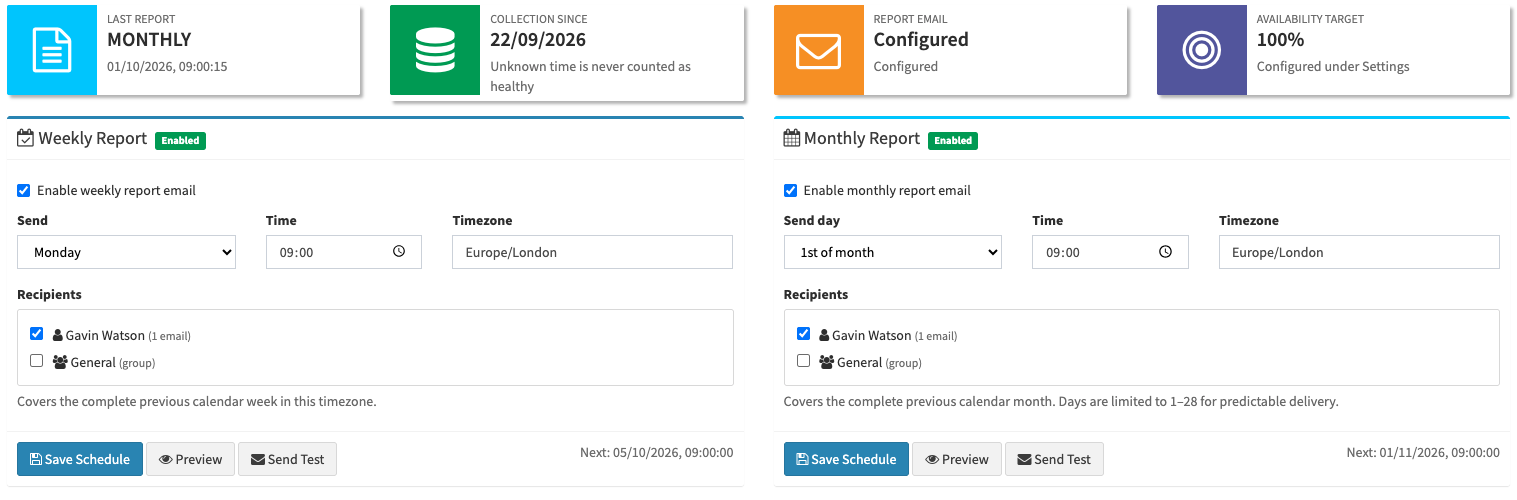
Weekly, monthly and on-demand HTML reports provide human-readable availability and service information for the programme input, encoder, PAD and EDI outputs, together with incident, failover and alert summaries. Reports can be scheduled and emailed automatically to selected recipients.

Built for service continuity

The platform separates source management, programme processing, encoding, PAD and monitoring so that one component can be restarted or recovered without unnecessarily restarting the complete service. Where technically possible, source and configuration changes are applied only to the component that actually needs to change.

If a programme source fails, the service can move through configured backups and emergency audio while the DAB/DAB+ encoder remains available. Failed configuration changes are validated and rolled back where possible instead of leaving the service in a broken state.

Why use autopo.st Cloud DAB & DAB+ Encoder?

A basic hosted encoder converts an audio stream into DAB or DAB+ and sends it to a multiplex. autopo.st manages the wider broadcast contribution chain around that encoder: source continuity, programme processing, metadata and artwork, EDI delivery, monitoring, alerting, analysis, audit history and reporting.

  • No dedicated DAB encoder appliance to purchase
  • No local encoder operating system or software stack for your team to maintain
  • DAB and DAB+ available from the same managed platform
  • Built-in source redundancy rather than a single stream URL
  • Integrated programme audio processing
  • Dynamic metadata, artwork and slideshow management
  • Multiple EDI destinations for flexible multiplex delivery
  • Integrated monitoring, analyser, alerts, logs and reports
  • Receiver-style preview of the generated listener-facing service state
  • Managed infrastructure designed specifically for broadcasters
  • Scale from a single service to larger multi-service deployments

What information does my multiplex operator need?

Your control panel clearly shows the parameters that need to match at the multiplex, including the selected DAB/DAB+ standard, output bitrate, codec or effective profile, channel mode where applicable and EDI destination information. The system does not pretend to configure the remote multiplex itself; it gives you the information required to coordinate the service correctly with your multiplex operator.

Ready to move your DAB or DAB+ service to the cloud?

Contact us with your required broadcast standard, bitrate, programme source and multiplex EDI details and we can help you plan the most appropriate setup for your station.


No. The DAB/DAB+ encoding runs in our managed cloud infrastructure. You only need to provide programme audio, either from an existing live stream or by connecting a compatible source encoder directly to our platform.

Yes. A service can be configured for DAB+ AAC-based encoding or classic DAB MPEG Layer II encoding. The control panel changes the relevant encoder settings and validation rules according to the selected broadcast standard.

Yes. You can configure a primary source, multiple backup sources and emergency audio. Automatic failover can move to the next healthy source if the primary becomes unavailable or meets your configured silence conditions, and authorised users can also select another source manually from the control panel.

Yes. Programme processing is applied after source selection and before DAB/DAB+ encoding, so the same processing follows the currently active source. Built-in controls cover level management, AGC, EQ, compression, limiting, stereo width and output gain, with optional Stereo Tool integration where configured.

Yes. Multiple EDI destinations can be configured, including primary and secondary delivery paths where required. Each destination is managed independently, with real TCP connection-state monitoring and clear unacknowledged status for UDP delivery.

Yes. The platform can generate DLS and DL+ from the effective now-playing metadata and deliver DAB Slideshow (SLS) artwork for compatible receivers. Metadata can follow the source that is actually on air and can also use rules, templates, scheduling, artwork mappings and manual overrides.

The platform can automatically move to a configured backup source. If all normal live sources are unavailable, emergency audio can be used as the final programme fallback. The event is recorded and alerts can be sent according to your notification rules.

Yes. The control panel monitors the input chain, source manager, processing stage, DAB/DAB+ encoder, PAD service and configured EDI destinations. It also provides live audio metering and a dedicated analyser for more detailed programme and technical visibility.

Receiver Preview combines the current service name, DLS, DL+, programme information and slideshow artwork in a receiver-style display. It provides a convenient visual check of the listener-facing state being generated by the platform.

Yes. Contacts and contact groups can be created and different alert conditions can be routed to different recipients by email, SMS, automated voice call, Slack, Teams, PagerDuty or webhook. Escalation, acknowledgement, recovery notifications and maintenance windows can also be configured.

Yes. Weekly, monthly and on-demand reports provide availability and operational information for the programme input, encoder, PAD and EDI outputs, together with failover, incident and alert summaries. Scheduled reports can be emailed automatically to selected recipients.